iOS 5.1.1 Untethered Jailbreak on Linux

The following tutorial will teach all Linux users how to jailbreak their Apple iPhone 3GS, iPhone 4, iPhone 4S, iPad 1, iPad 2, iPad 3, iPod Touch 3G and iPod Touch 4G devices.
As you all know, the Chronic Dev Team finally released today, May 25th, the highly anticipated 2.0 version of Absinthe jailbreak tool for the Linux, Mac OS X and Windows platforms.

With Absinthe 2.0 users will be able to easily untether jailbreak their iPhone, iPod and iPad devices, and today's tutorial I will teach exactly that, step by step, with screenshots.

Supported devices:

· iPhone 3GS;
· iPhone 4;
· iPhone 4S;
· iPod Touch 3G;
· iPod Touch 4G;
· iPad 1;
· iPad 2 Wi-Fi;
· iPad 2 3G;
· iPad 2 2012;
· iPad 3 Wi-Fi
· iPad 3 Wi-Fi + 4G;

Requirements:

· Absinthe 2.0;
· A device from the above list with iOS 5.1.1 firmware.

Step 1 - Download Absinthe 2.0

You can grab a copy of the Absinthe 2.0 jailbreak tool right now from here.

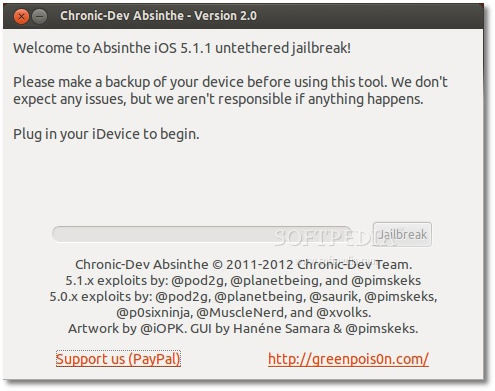
It's a tar.gz archive so just extract it on your downloads folder. Enter the directory and run the x86 or x86_64 (depending on your architecture) executable by double-clicking it.


Step 2 - Connect your iPhone, iPod or iPad device

WARNING: Make sure that your iPhone, iPod or iPad device is supported (see the supported devices list at the end of the article) and it was already updated to iOS 5.1.1 via iTunes!

ATTENTION: ALWAYS make a backup of your device(s) before the jailbreak procedure! Make sure the battery is charged over 50% and that the device is connected to the computer via the USB cable! Not meeting these requirements will result in a failure!

Editor's note: This tutorial is NOT for owners of devices that are blocked in other networks than the one used. You know how you are!

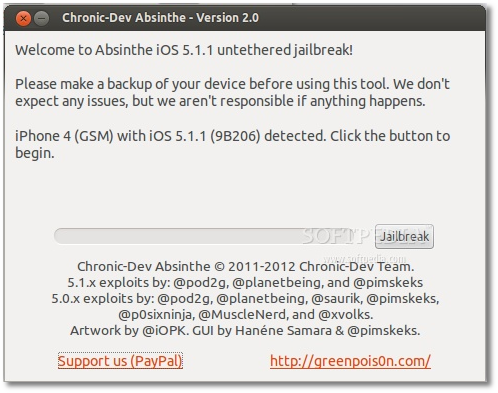
Once connected, Absinthe will immediately detect your device...


Step 3 - Jailbreak your iPhone, iPod or iPad device with Absinthe 2.0

All you have to do now is to click the "Jailbreak" button and wait for the Absinthe tool to do its job. You can also watch the jailbreak progress on your device. DO NOT PUSH ANY BUTTONS! DO NOT REMOVE ANY CABLE!

When the progress bar on the Absinthe tool is complete, and the Absinthe icon appears on your device, launch it to complete the jailbreak process.


When Absinthe finished the jailbreak process, reboot the device and you'll see the Cydia icon on your iDevice's home screen, which means that the jailbreak process is over and you can go connect it to iTunes to restore the backup.
Read more »

UEFA Euro 2012 DLC for FIFA 12 Gets New Update on PC, PS3 and Xbox 360


Electronic Arts has confirmed that it’s just released a fresh update for the UEFA Euro 2012 downloadable add-on that came out last month for the FIFA 12 soccer simulator, addressing a wide range of issues.

As a break from the FIFA norm, EA launched the UEFA Euro 2012 experience, modeled after the upcoming real-life tournament that’s set in Poland and the Ukraine, as a downloadable add-on, and not as a full-fledged retail game.

While the move wasn’t exactly welcomed by fans, as it came out just for FIFA 12, it still impressed the ones who already had the soccer simulator.

Sadly, it seems that quite a few problems were encountered by players, many of whom are now fixed by a new update that’s just been released on the PC, PS3 and Xbox 360 platforms.

“A new update for the Euro 2012 expansion pack is currently being rolled out on all platforms! We’d like to thank the FIFA community (and a special thanks to our forum members) for providing continuous feedback.”

Check out the full list of improvements made to the UEFA Euro 2012 DLC below, according to EA.

• We have addressed occasional game freezes encountered in the Team Management screen.
• We have fixed freezes that could sometimes occur at the end of Expedition, Tournament, and Kick Off mode matches.
• Users with Assisted controls will no longer be able to search for Manual games.
• Users will no longer be able to switch to the goalkeeper in Online Tournament mode.

EA also promises that the development team is still studying the feedback provided by fans and would release some more updates for the expansion in the near future.

Until then, FIFA fans can look forward to the release of FIFA 13 in September for a variety of platforms, including the PC, PS3 or Xbox 360.
Read more »

Firefox 15 Now Has Background Updates


One big piece of the silent updates puzzle has just landed in Firefox 15, background updates. Like the name suggests, this enables Firefox to install updates in the background without disturbing the user. This, along with the other silent updates-related features, should make the entire process a lot more hassle-free and almost invisible to the user.

The goal with background updates is to have newer versions of Firefox downloaded and installed while the browser is running. This way, the next time the user loads Firefox, the updated version is already installed and all that's left to do is some clean up.

In the vast majority of cases, users shouldn't even notice the slight increase in startup time and would have no idea that Firefox was updated.

This is the way Chrome updates work and this is the most efficient since users don't get bothered with it. This ensures that newer versions of Firefox are installed as soon as they arrive, not as soon the user makes time for it.

The downside of this is that users have less control over the update. For most people, this is hardly a bad thing – they don't want to be bothered with updates, they want their browser to work.

With this new feature, more people should be running the latest version of the browser at any given time than ever before, certainly than since the rapid release cycle was implemented.

However, there are users that want to have more control over the update process. Luckily for them, unlike in Chrome, all the automatic update system is optional. While silent automatic updates is the default, users will have options.

The background update feature is now enabled in Firefox 15, but there's no guarantee that it will make it into the stable version a few months from now, when it lands.
Read more »

Create entertaining animations on iOS

Creating animations on your iPhone is incredibly easy with the right app, and a few of them stand out for the number of features and interesting things you can make.

This week's collection of apps is all about making short animations. The first makes stop-motion animations by taking several photos of a moving object. The second makes short videos into animated GIFs you can add to text messages. The third is Cinemagram, an app that lets you make photo and video hybrids that are simple and fascinating.

GifBoom (Free) lets you create animated GIFs using multiple photos, and it does a pretty good job, but there are better options available. The app offers a social component that lets you share your animated GIFs, see popular posts, make comments, and follow other users. The interface is easy to understand, with buttons across the bottom for viewing a feed of people you follow, checking out the latest and most popular submissions, looking at recent activity, and options for finding friends and tweaking your profile.

To create an animated GIF, simply touch the camera icon in the bottom center of the screen. With the camera open, you have buttons for using your iPhone flash, switching between front- and rear-facing cameras, and a zoom slider. You also have the option here to assemble your animated GIF from images in your iPhone photo library. Touch the camera icon on this screen to start recording. As you record, you'll notice a counter in the lower right-hand corner of the screen that shows how many photos are being snapped. Once it reaches the maximum of 20, the app sends you to a screen where you'll pick the photos for your animation.

Before your GIF animation is posted, you can put the finishing touches on your project in GifBoom's preview screen. You can rotate the orientation, uniformly crop all images, add effects, add a frame, and type words that show up onscreen as part of the animation. Once you're satisfied, you can hit Next, and in the last step, you can add a caption and choose whether you want to additionally share your animation with Facebook, Twitter, Tumblr, via e-mail, or through iMessage. Even if you choose not to share via those methods, when you touch Publish, your animation will be shared with other GifBoom users.

The process is fairly straightforward in GifBoom and the social components are executed well, but the resulting animations aren't very smooth. In the settings you can set GifBoom to take more photos per second to alleviate some of the stop-motion effect, but you'll never get a smooth animation like you will from the other apps in this collection. It's also important to note that this app seems to be embraced by a young audience (with mostly teenagers posting animations).

GifBoom offers a lot of extras that make the app admirable, but the resulting animations are not on par with other apps in this collection. Still, if you like the idea of creating animated GIFs that have a more stop-motion quality, GifBoom might be a good option.

MyFaceWhen (Free for a limited time) lets you shoot
a short video using a much simpler process and doesn't offer the social connectors of GifBoom, but the resulting animated GIFs are smooth as silk. The idea behind the app is that while texting you might want to attach a video reaction to what your friend just said. In other words, "This is My Face When you said that."

Creating a smooth animated GIF couldn't be easier. You simply touch the center of the screen to start recording and touch it again to stop. From there the app processes your short video and turns it into an animated GIF. The app's GIF editor lets you trim the length of the video and optionally fine-tune the starting and ending points to make the loop a smoother transition. The whole process takes about a minute, making MyFaceWhen ideal for dropping a quick animated GIF into a text message.

MyFaceWhen produces great results, but I do have some complaints. If you want to share your GIF animation beyond iMessage, you're out of luck. The app only offers the option to copy the GIF to your clipboard and doesn't offer any connections to popular social-network services. It's also important to note that the animated GIF will only play in the small preview window of text messages. Touching the animation (as you would do to zoom in on a photo in iMessage) shows you a still image. The developers are careful to point this out in their description of MyFaceWhen. But even without being able to zoom in on animations, having a small animation that plays in the iMessage window is a pretty cool addition to your text messages.

Overall, MyFaceWhen is an incredibly simple app for making animated GIFs you can drop into iMessage. It's not as feature-packed as other apps (and another means of sharing the animations would be first on my wishlist), but it does what it does very well. If you're looking to add something extra to your texting, definitely check out this app.

Cinemagram (Free) lets you create a fascinating
hybrid of photo and video to make cool-looking animations you can share on Cinemagram's social platform and other social-networking services. The app leads you through the process, which requires a little more work than MyFaceWhen, but produces unique-looking animations.

What you can do with the app is create a still photo with only part of it animated, for a really cool-looking effect. The best way to understand Cinemagram is to launch the app and see what other users have made. The app has its own social platform similar to photo-sharing app Instagram, with feeds for popular animations, the latest animations from everyone, or animations from just your friends. There are a lot of talented Cinemagram users out there, so checking out the possibilities is the best way to get acquainted with what the app does.

When you're ready to create your own Cinemagram, touch the Capture button in the bottom center of the screen and then touch the record button. When you're finished recording, you'll move on the next step, which is to draw a mask. The mask is the area of the Cinemagram that will be animated. When you're finished drawing the mask with your finger, hit Next to "Colorize" (the app's name for image filters) your Cinemagram. The app offers 10 different filters to choose from, with options like redscale and sepia.

When you're finished you can preview your Cinemagram before posting it to the feed. You also have the option to go back and change your mask or Colorize selection if you want to make tweaks before posting.
In addition to sharing on the Cinemagram platform (complete with Likes, comments, and comment replies), you can also share your project on Facebook or Twitter, or via e-mail.

Cinemagram is a fun and unique app for creating photo and video hybrids and I've been amazed by some of the stuff people have made using the app. If you want to try an interesting app for creating animations, Cinemagram is an excellent choice.
Read more »

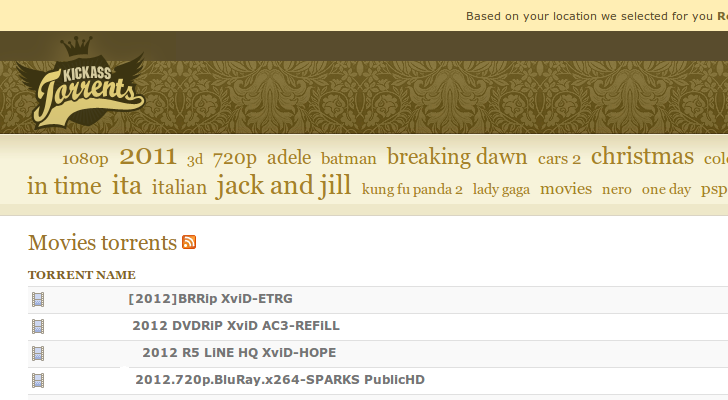
KickAssTorrents to Be Blocked in Italy


The Pirate Bay may be getting some support from ISPs in some places, but other BitTorrent sites are not so lucky. With The Pirate Bay already blocked in the country, Italy has now turned its eye on a popular alternative, KickAssTorrents.

Unlike in some places, say the UK or the Netherlands, but very much like in other places, copyright lobbying groups have gotten the country's authorities to play copyright cops and spend the public's money defending US companies.

Authorities in the country are boasting that they've managed to force ISPs to block the site, which they claim is generating millions of dollars in revenue per year, exploiting hard working artists. Only the old domain name is mentioned, so the new one, kat.ph, may not be targeted.

Italian BitTorrent users are very familiar with ways of getting around this type of blocks and their skills will only get better as authorities continue to hunt down sites. Those skills may come in handy if and when Italy decides to block YouTube or other video sites.
Read more »

Google Still the Biggest Site in the US, Far Ahead of Facebook


Facebook is growing stronger and stronger and getting a lot of people to spend a lot of time on the site, but it's still not the biggest website, at least not in the US.

Google still holds the title, unsurprisingly, though Facebook is coming up the ranks. It's only in fourth place though, well behind even Yahoo, in terms of unique visitors.

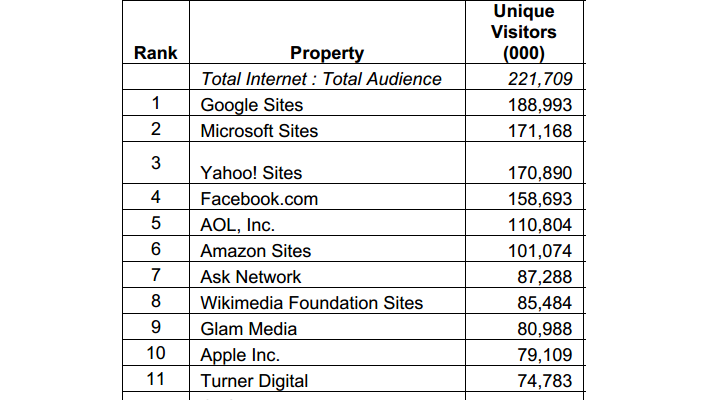
In April, Google was the most visited website, well websites as comScore counts several Google properties in its report, with 189 million people coming through its doorstep.

Microsoft, which was the second most visited site didn't even come close and is in fact almost tied to Yahoo. Microsoft had some 171.168 million visitors, but Yahoo sites had 170.890 million, a very close call.

Facebook only had some 159 million visitors, but was still far ahead of AOL, which followed with 111 million. You can check out comScore's full report here (PDF)
Read more »

Sophos Shuts Down Partner Portal After Discovering Hack Tools

The world renowned security firm Sophos has revealed that its Partner Portal has been temporarily taken offline after a couple of “unauthorized programs” were found on the server. It’s believed that the malicious elements were designed to allow hackers to gain remote access to information.


The security breach was discovered on April 3 and as soon as the hack tools were identified, the partner logins were suspended, but only for those who haven’t moved to the new SFDC portal.

An investigation is ongoing, but initial analysis of the incident reveals that the server’s database includes partner names, email addresses, business addresses, contact information and hashed passwords.

It’s uncertain if the data was accessed by the individuals who breached the server, but the company considers that it must assume the worst.

“When the Partner Portal comes back online, you will find that your password has been reset as a precautionary step, just in case it fell into the wrong hands,” reads the statement issued by the company.

“You should, of course, ensure that you never use the same password on different websites - and if you did use your old Partner Portal password on other sites, we would advise that you change the login credentials on those sites to something unique.”

If the email addresses were stolen, they may be used by the cybercriminals to launch phishing expeditions that are cleverly designed to appear as originating from Sophos. This is why it’s crucial that the organization’s partners keep an eye out for any suspicious notifications that carry links or, even worse, attachments.

Hopefully, it will turn out that no data was accessed by the hackers who placed the remote access tools, but until things are clarified, it’s best for Sophos partners to act with caution and apply the security practices recommended by the firm.
Read more »

Romanian Government Portal Defaced by Anonymous, President Mocked

The Public Information Portal (publicinfo.gov.ro), a website owned and managed by the Romanian government, was breached and defaced by members of Anonymous.

The main page of the website where Romanian citizens can obtain documents and information on projects and laws has been altered to display an image that mocks the country’s president, Traian Basescu.

“Hello to all visitors. We recently found out that our president Basescu (aka Base) is gay, part-time n***r and also pregnant :s Meanwhile, after long researches we think that we finally managed to find his cousin too,” the hackers wrote.

“That’s all for now. Stay tuned for the dumps and more great news! Cheers ;).”

According to the hackers, they plan on leaking all the files and all the information stored in the site’s database, but not before analyzing it.

The hackers told us that there wasn’t any particular reason for targeting the Public Information Portal. They simply breached it because it belongs to the government and “anything that belongs to the government must be hacked.”

While this article was written, the website was taken down, but the image posted by the hackers could be seen by the site’s visitors for more than an hour.

Of course, this is not the first time when Anonymous strikes a site that belongs to the Romanian government.

On April 2, they defaced the website of Miercurea Ciuc, a city where the majority of the population is ethnic Hungarian, to protest against the demands made by the community lately.

Other recent hacks targeted Atomic Data and Analysis Structure for Fusion in Europe (ADAS-EU), numerous science and research facilities, and the site of the International Monetary Fund.
Read more »

Sony Hacker Pleads Guilty, Faces 15-Year Sentence


24-year-old Cody Kretsinger, former member of the LulzSec crew, known on the hacking scene as recursion, pleaded guilty in front of a US District Court judge for breaching the systems owned by Sony Pictures Entertainment.

According to azcentral.com, he admitted to one count of conspiracy and one count of unauthorized impairment of a protected computer.

The sentence will be carried out on July 26, giving Kretsinger time to think if the fame he gained for hacking into Sony’s systems was worth spending 15 years in jail.

Kretsinger was arrested in September 2011, along with two other alleged hackers. Around one month later, he pleaded not guilty to the charges that were brought against him.

He also became famous after the owners of hidemyass.com, the service that was supposed to keep his identity private, ratted him out to law enforcement representatives.
Read more »

iPad 3 Get Torched by Lasers (Video)


Kip Kedersha (KipKay on YouTube) is showing off one of his latest projects, if you can call it that, which involves the third-generation iPad, a bunch of lasers, a Flash Torch, and the Solar Death Ray. Pretty much everyone knows where this is going, right?

Not that the headline hasn't given it away already, but this iPad destruction video really manages to impress.

The iPad can be seen twitching as the lasers hit its sleek Retina display, then succumbs as the Flash Torch burns its front side completely.

At this point, KipKay was still not finished with the tablet. He turned it upside down, gave it the Solar Death Ray and blew up its battery.

The device literally lifts off the ground as the battery cells burst, leaving toxic black dust and smoke behind.
Read more »

Flaw in Facebook and Dropbox Mobile Apps Allows Data Theft

Security expert Gareth Wright identified a security hole in the iOS version of the Facebook app that could allow someone with ill intent to steal user credentials. After further analysis, the folks over at The Next Web determined that Dropbox also presents the vulnerability.

Furthermore, it has been found that not only the iOS applications are vulnerable, but also the ones developed for Android devices.

While navigating through application directories with a free tool called iExplorer, Wright discovered that the Facebook app for iOS devices stored some highly sensitive data in clear text.

“Popping into the Facebook application directory I quickly discovered a whole bunch of cached images and the com.Facebook.plist. What was contained within was shocking. Not an access token but full oAuth key and secret in plain text,” he wrote.

After analyzing his finds, he was able to determine that the .plist file, when transferred to another device, can be used to access the Facebook account associated with it.

Initially, Facebook representatives came forward to argue that the attack vector only works on rooted phones, but as it turns out, it works even on machines that haven’t been tampered with.

Now, many may think that this is one of those vulnerabilities where an attacker would need physical access to the device, but in reality, it’s far more complex than that.

Wright proved that if a malicious app is installed on a shared PC, a public docking station, or any other apparatus to which phones may be connected, the file could be retrieved.

With Dropbox it’s basically the same. The file-hosting service also uses the .plist file incorrectly, allowing anyone who gains access to it to breach the owner’s account.

Apparently, Facebook is working on addressing the problem, but the worrying thing is that if two popular apps handle these files in this manner, it’s likely that ones form other developers do the same.

So, until a more permanent fix is made available, think twice before connecting your iOS or Android phone to a public PC or docking station.
Read more »

Scammers Target Facebook Users in Polymorphic Attack


Malicious Facebook advertisements usually lead users to survey scams, pieces of malware, phishing sites and other types of dangerous cybercriminal schemes. However, Bitdefender experts came across a polymorphic attack that could end in any of these scenarios.

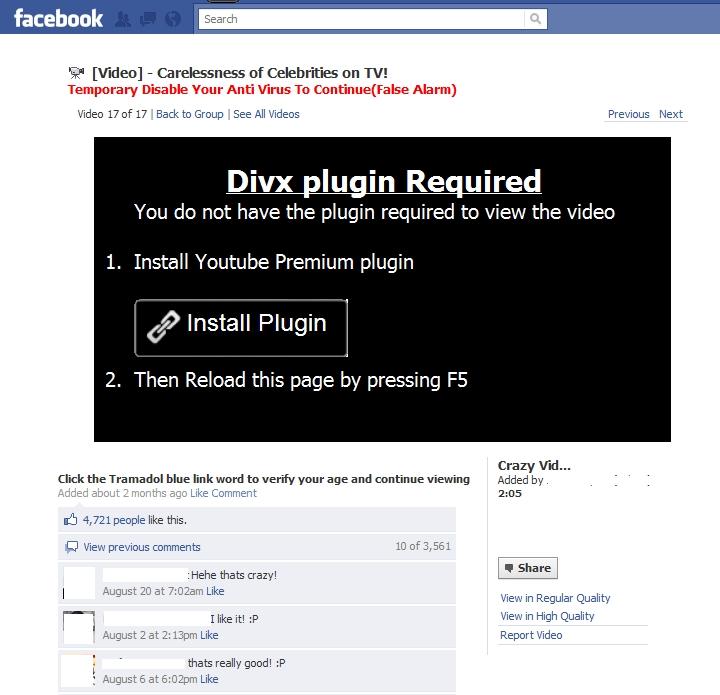
The attack starts by promising users an alleged adult video. Once the link from the shady post is clicked, the user is taken to a site that replicates Facebook. Here, the victim is requested to install a Divx plugin for the browser, which is supposedly needed to view the much promised footage.

The clever thing about this page is this message: Temporarily disable your antivirus to continue (false alarm).


With this alert, the cybercrooks hope to determine users to ignore the potential warnings that their antivirus solutions may display.

When the install plugin button is pressed, the internaut is served with a rogue YouTube extension that basically takes control of the browser.

After the browser extension is installed, the whole fun starts, and with it, the user experiences firsthand the effects of a polymorphic attack.

It not only takes over the victims’ profile to Like and Share other malicious advertisements on their behalf, but it also takes control of the browser and starts serving other malicious elements.

“This is an interesting and quite complex type of scam. In data security lingo, this would qualify as a polymorphic attack, which basically means that the malicious content served can be changed by the attacker thanks to the browser extension installed,” explained Andrei Serbanoiu, Bitdefender online threats analyst programmer.

“If one user lands on the adult chat page, another may reach the malware downloader or even a whole different web page set up for phishing.”

Users are advised never to install browser extensions that come from untrusted sources, and more recently, even the ones that come from legitimate websites may turn out to be malicious.

Read more »

Google Awards $6,000 (€4,500) to Experts for Finding Chrome Vulnerabilities


The Beta and Stable channels of Chrome, Google’s popular browser, have been updated to version 18.0.1025.151. With this latest update, a number of improvements in the security sector were also rolled out.

Some of the security experts that uncovered the vulnerabilities, including miaubiz, Arthur Gerkis, and SÅ‚awomir BÅ‚ażek, were rewarded by Google with $6,000 (€4,500) for their finds.

The most important fixes that mark this release are for use-after-free issues identified in different scenarios, such as run-in handling, line box handling, v8 bindings, SVG resource handling, focus handling and when applying style command.

The medium severity security holes include an out-of-bounds read in Skia clipping, a cross-origin iframe replacement, a use-after-free in media handling and a read-after-free in script bindings.

A single low severity flaw, described as “cross-origin violation parenting pop-up window,” was addressed.
Read more »

Twitter Takes Biggest Spammers to Court

Twitter spam isn't much of a problem, in the sense that it's not a bigger problem than in other places online, but it exists and most users encounter it from time to time. Twitter has been doing well at combating spam, at the very least, it's doing a lot better than in some previous years.


Now though, it's leaving the technological tools to the side and combating spam in another way, with lawyers. Twitter has sued five spammers or companies that make spam tools in an effort to go after the root of the problem.

"By shutting down tool providers, we will prevent other spammers from having these services at their disposal. Further, we hope the suit acts as a deterrent to other spammers, demonstrating the strength of our commitment to keep them off Twitter," Twitter wrote.

Twitter explained that, while its efforts at combating spam were paying off, trying to cut off the source might be a better solution, or at least a more effective one. Along with its improving spam-fighting tools, taking spammers to court should be a good deterrent. It also sends the signal that Twitter won't put up with spam any more.

"Our engineers continue to combat spammers’ efforts to circumvent our safeguards, and today we’re adding another weapon to our arsenal: the law," Twitter explained.

"One challenge in battling spam is bad actors who build tools designed to distribute spam on Twitter (and the web) by making it easier for other spammers to engage in this annoying and potentially malicious activity," it added.

But Twitter is also improving its existing tool, it just rolled out a new way of combating @reply spam recently, a form of targeted spam that has been on the rise. Twitter also relies on its URL shortener to control the links that enter the site and remove the ones leading to malware, phishing sites and so on.
Read more »

Hacker Claims Breach on Chinese Military Contractor CEIEC

A hacker that calls himself Hardcore Charlie claims to have “owned” CEIEC, China National Electronics Import-Export Corporation, a company that’s believed to be connected to the Chinese military.

“Today us prezenta recently owneed chino military kontraktor CEIEC. Us be shoked porque their [expletive] was packed with goodiez cummin from a USA Military brigadezz in Afghanistan,” the hacker wrote on Pastebin.

“Them lulz hablando mucho puneta about sam slit eyed dudz in Vietnam and Philiez doing bizness in Ukraine and Russia selling goodiez to Taliban terrorists. Us dedikate this reliz in honor of those Fallen, remember them!(sic)”


If the hacker’s claims are true, it would be the second time this year when alleged military secrets end up publicly available.

In January, Softpedia reported that the hacker collective called Lords of Dharamraja leaked a document that showed how the Indian government was aided by major mobile phone manufacturers to spy on the US-China Economic and Security Review Commission.

Of course, at the time, the firms mentioned in the document rushed to deny the “evidence.”

In the scenario Softpedia are presented with today there’s not much difference, as the document leaked by the hackers apparently contains military secrets that relate to Afghanistan, Iran, and Vietnam.

However, while some of the documents look like they carry secret data, with charts and graphs and everything, the information from at least one of the scanned files is publicly available on the Internet.

Hardcore Charlie has published a 2.2 gigabyte archive that is only the first part of the information he claims to have obtained as a result of the hack on CEIEC.

While the legitimacy of these documents can be questioned, it’s clear that hacktivists have focused their attention on China this week, defacing more than 400 websites that belong to the country’s government.
Read more »

More Windows 8 Post-Beta Details Emerge

Contoh Windows 8 :) length=

Microsoft is well underway with the development of the next flavor of its Windows 8 platform, expected to land in the next few months as a Release Candidate.

Currently in post-Beta stage, Windows 8 is undergoing various changes that should become available with the RC bits.

Microsoft keeps mum on the changes it is currently applying to the platform, but leaked info on the matter did make it online.

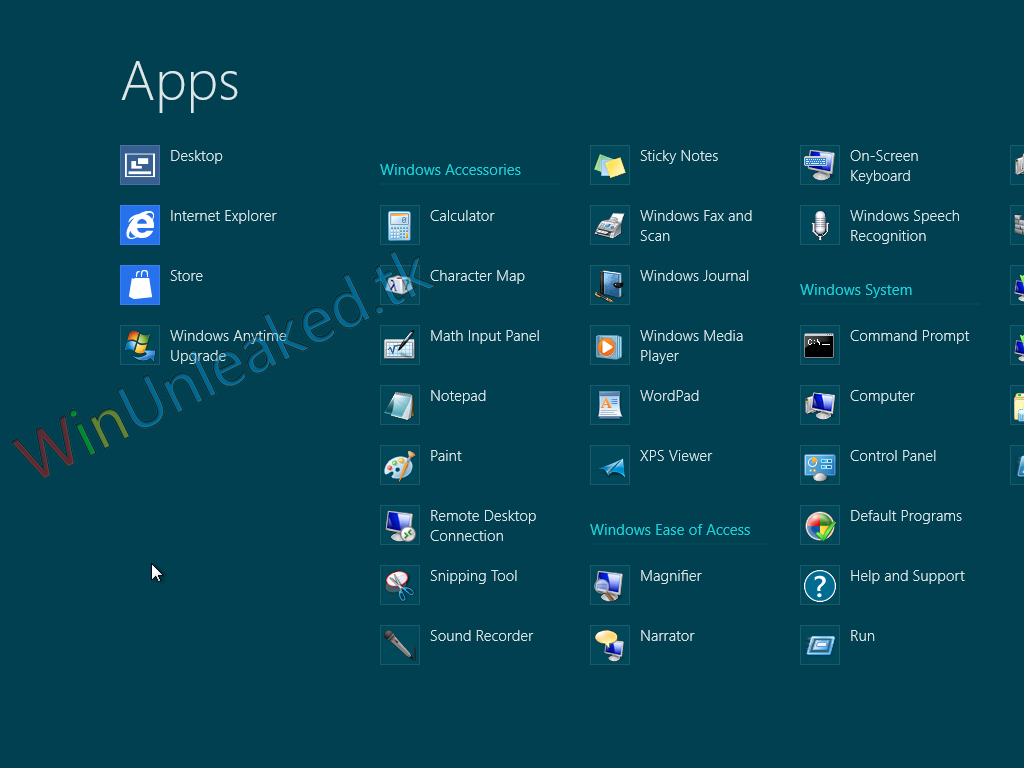
Courtesy of WinUnleaked.tk, we now learn that, among the various Windows 8 SKUs that Microsoft is getting ready for launch, there will also be one called “Core.”

Apparently, this version of the operating system is branded simply Windows 8, and might be launched simply as a classic flavor of the platform (it could be a stripped-down, “Basic” SKU).

No special features were spotted in this OS iteration for the time being but, since the development of the various Windows 8 SKUs has just kicked off, chances are that these differences will begin to emerge soon.

Windows 8 “Core” is said to arrive without the Media Center, something that is expected to be common to most commercial versions of the operating system.

Windows 8 is expected to hit Gold status this fall, and should become commercially available sometime in October, three years after Windows 7 was launched.

In the meantime, Microsoft will have to reach other milestones with the platform, including the Release Candidate in the next few months and the RTM version sometime in summer.

When made available, Windows 8 will offer support for both traditional desktop PCs, which require a keyboard and mouse for input, as well as for touch-enabled tablet PCs (in fact, it will be optimized for use on these).

At the moment, the platform is available for download for free as a Consumer Preview, a version released on February 29th, during the Mobile World Congress in Barcelona, Spain.

You can download the Windows 8 Consumer Preview Build 8250 from Softpedia via this link.
Read more »

How to Make Your Own iOS Games

“Featuring a @SteveWoz intro, Tap, Move, Shake will show you how to make your own #iOS game,” reads the latest tweet from Apple through the @iBookstore Twitter handle.

The company run by Tim Cook seems eager to promote a book written by Todd Moore and published by O'Reilly Media, Inc. which acts as a complete do-it-yourself guide on how to make your game idea a reality for the iPhone and iPad.

“By developing a real game hands-on through the course of this book, you’ll get a thorough introduction to Xcode and Objective-C, while learning how to implement game logic, sophisticated graphics, game physics, sounds, and computer AI,” says O'Reilly Media.

According to the publisher, Moore taught himself how to create an iPhone game in a week. He had no previous knowledge of Apple’s development tools whatsoever, and now he is working full time as a smartphone games developer.

While his book doesn’t guarantee that you’ll roll out the next best thing to Angry Birds, the guide does promise to enable any coder to turn game ideas into real products, ready for the App Store.

One buyer posted a short review of the book after flipping through its pages and claimed “I found some real gems in this book and love the example of creating the old school game of Pong in only 20 lines of code.”

“It really illustrates how to keep things simple. The book also covers how to market your game which is important these days given how many apps are in the store. The foreword is by Steve Wozniak was a surprise because its not listed in the product description,” said the user, identified as AWESOMO-2000 on Apple’s App Store.

Another buyer, Bruce Sackett, says that the e-book moves a reader very quickly into developing simple games and that it includes a good discussion about adding sounds, and graphics using Adobe Fireworks.

The book requires iBooks 1.3.1 or later and iOS 4.3.3 or later.
Read more »

How to reinstall OS X after malware infection


While instructions are available to remove the latest malware threats for OS X, some may choose to simply reinstall OS X and start from a clean slate.

The recent Flashback malware for OS X has caused a bit of a stir in the Mac community, and while it has only affected a fraction of the OS X install base, it still has had people who have indeed found the malware on their systems writing in to CNET and on the Apple Discussion boards.

For the most part, people have been finding the malware on their systems by having an antivirus scanner or reverse firewall such as Little Snitch installed, and have either been given an alert that the malware was either found or a program file with a short name beginning with a period attempting to contact remote servers via bizarre-sounding domain names such as cuojshtbohnt.com, and gangstaparadise.rr.nu.

These clear attempts have spurred investigation into the malware and have shown that this activity is the first part of the malware attack, where the malware has broken the Java sandbox and the program is trying to download the payload that will subsequently piggyback on local applications by altering launch environment variables either within the program or in the user's account.

So far the malware has been fairly well described, and is not viral in nature, so for any particular variant it installs to a single location and runs from there to affect the system. As a result, when a variant has been characterized, you should be able to remove it from your system by following detailed instructions. However, malware can change rapidly (as Flashback has demonstrated) and because new variants may appear that will change the attempted modes of attack, there may be those who cannot determine which variant they may have encountered and doubt their abilities to manually clear the malware from their systems.

In these situations, there are two approaches you can take. The first is to get a reputable malware scanner such as VirusBarrier, Sophos, or ClamXav, install and update it, and then have it scan the system for known variants of the malware. By doing this you can at least quarantine any malware files found.

This is a recommended approach; however, it does rely on malware definitions having been defined for the malware, which may lag behind initial findings of malware.
The second approach is to forgo attempting to manage the malware and perform an OS reinstallation. While this will ensure that you start from a clean slate, it will be a bit of a burden for some people to do, especially since you may not be able to trust Time Machine backups or system clones to be free from the malware and therefore may not be able to simply restore your system from a backup.

If you can remember an exact instance of when your system was affected by the malware, such as when you installed a recent update to Flash that might have been the malware, or when you first saw any other warning signs pertaining to the malware, then you might be able to reinstall using backup from before the problem occurred; however, in many cases you might not be able to reliably identify such instances.

If you have decided that it would be best for you to play it safe and wipe your system and start over, by following this procedure you should be able to do so while preserving your data.

Sync and back up

First ensure that your system is properly synced to your Cloud-based services (iCloud, Google, Yahoo, etc.) to ensure items like contacts and calendars are saved. You can also go to Address Book, iCal, and other programs that you regularly use, and export the calendars, contacts, and other data to save to a flash drive or other separate storage medium. Such actions will ensure you will be abel to restore some of these items without relying on sync services to manage them for you.

In addition to syncing, be sure your system is backed up. Use Time Machine or a cloning tool to back up your files, or at the very least manually copy all the folders from your home directory to an external hard drive, and do this for every active account on the system by logging into each and performing these actions.

When you are done backing up, unmount and detach the external hard drive you used for the backup.

Format the drive

Reboot the system to the OS X installation DVD for OS X 10.6 or earlier (hold the C key at startup with the DVD in the optical drive), or reboot with the Command-R keys held for OS X 10.7. When the OS X installer loads, select your language and then open Disk Utility (available in the Utilities menu if it's not presented in a Tools window).

In Disk Utility, select your boot volume and then use the Erase tab to format it to "Mac OS X Extended (journaled)." This process should be fairly quick, and when done should leave you with a blank hard disk.

Reinstall OS X

Quit Disk Utility and then open the OS X installer. Do not choose any option to restore from backup. Follow the onscreen instructions to select your newly formatted hard drive and reinstall OS X, and then wait for the installation to complete.

Create a new account

When OS X is freshly installed it will ask you whether you would like to migrate data from a backup or from another computer. Avoid doing this, and instead create a fresh user account for yourself (you can use the same account name and other information).

Update the system

When you first log into your account, go to Software Update (in the Apple menu) and update the system to the very latest version. Run Software Update several times until no more updates are available.

Deactivate Java

The latest Flashback malware threats target systems with Java vulnerabilities. While Apple stopped shipping Java with OS X Lion, prior versions of OS X do have it installed by default. Often Java is not needed for running applications in OS X, so unless you have specific need for it, then turn it off. Even if you suspect you might need Java, you might consider starting with it disabled and then only activating it based on demand.

There are two general ways to manage Java in OS X. The first is through application-specific settings such as the preferences for Safari, Firefox, and other Web browsers, where you can locate settings to disable the Java plug-in and Java management (do not disable JavaScript). These settings will ensure speific programs do not use Java, and for the most part will be enough to prevent Java from being taken advantage of on the system; however, if you reset Safari or install a new Web browser then you may inadvertently use Java.

To prevent inadvertent uses of Java by programs, you can open the Java Preferences utility in the /Applications/Utilities/ folder and uncheck the listed Java runtimes to disable them systemwide. If upon opening the Java preferences you get a warning about needing to install Java, then your system does not have it installed and you do not need to do anything else.

If you do need Java installed and active on your system, then be sure to apply the latest Java software update, and consider disabling it in Web browsers.

Restore your data from backup

The next step is to copy your data back to your system from your backups. Do not use Apple's Migration Assistant tool to do this since it will restore folders and applications that may have been altered by the malware, so instead copy the files from your Documents, Movies, Music, and other home directory folders to their respective locations within your user account.

The current Flashback malware has affected contents of the user library, particularly the Launch Agents folder, and while you can restore the contents of the folder to your new user Library to preserve some settings and configurations, for the sake of the extra care being taken in this approach, it is best to leave that folder alone and only restore individual items out of it only as needed.

At this point you can set up iCloud or other sync services in the system preferences, and then launch Address Book, Mail, iCal, and other programs you use to configure those programs and the accounts you use with them. If your contacts and calendars are missing, then you can re-import them from the manual backups you previously created.

Perform steps 6 and 7 for any additional user accounts on the system by first creating the account, deactivating Java, and then restoring the account data from the backup.

Reinstall applications

The next step after restoring your accounts is to reinstall the applications you use. While your previous set of applications were backed up before you started this procedure, avoid restoring them or opening them because in one mode of infection the Flashback malware does directly alter some of these programs. Instead, use the backup as a reference for which applications you previously had and reinstall them from their installation discs, the Mac App Store, or other means by which you originally obtained them.

When you have installed your applications, be sure to fully update them and then open and configure them according to your preferences.

At this point your system should be back up to a usable state, and you should be able to continue your workflow as it was before reinstalling. If you find you are missing some required fonts, sounds, or other files that your applications need, then you can access them from the global /Library folder from the backup or in the /Library folder from your user account.

The final step in this process is to protect yourself from further infection. While disabling Java as mentioned above is one step, you can take additional ones to help secure your system. Install a reverse firewall such as Little Snitch to help detect and block programs from phoning home to remote servers, and consider installing an antivirus utility.

While you do not have to configure the antivirus tool to diligently scan all files on demand, you can set it up to scan common downloads folders only (such as the Desktop or the Downloads folder within your user account) and then once a week or perhaps once a month have it scan the whole system. For now, despite the latest malware news, this should be enough to ward off malware and provide you with ample protection.
Read more »

[Puisi Tradisional] Pantun Empat Kerat (Budi)

Maksud

Rangkap 1
Seseorang yang berbudi, namanya pasti akan disebut-sebut.

Rangkap 2
Seseorang yang berbudi akan terus menjadi sebutan walaupun telah meninggal dunia.

Rangkap 3
Walaupun hanya sedikit budi yang ditaburkan akan tetap dikenang.

Rangkap 4
Perasaan kasih sayang yang wujud dalam diri seseorang akan menyebabkan hubungan
mereka berterusan ke akhir hayat.

Tema

Kelebihan mempunyai budi pekerti yang baik

Persoalan

1. Persoalan budi yang sentiasa dikenang walaupun telah meninggal dunia.
2. Persoalan ketinggian nilai budi.
3. Persoalan kasih sayang yang wujud sesama insan hasil daripada budi yang ditaburkan.

Bentuk

1. Terdiri daripada empat rangkap.
2. Setiap rangkap terdiri daripada empat baris
3. Jumlah perkataan dalam setiap baris antara tiga hingga lima.
 Anak itik terenang-renang (tiga perkataan)
 Jika tak kenang kepada saya (lima perkataan)
4. Terdiri daripada 9 hingga 11 suku kata.
 Terang bulan terang di paya (9 suku kata)
 Orang yang mati meninggalkan nama (11 suku kata)
5. Rima akhir pantun ini ialah abab
6. Bentuk pantun ini terikat dengan puisi tradisional.

Gaya Bahasa

1. Asonansi - Terang bulan terang di paya - pengulangan vokal a
2. Aliterasi – Orang yang mati meninggalkan nama. –pengulangan konsonan g
3. Kata ganda - Anak ikan terenang-renang
4. Sinkope – Jika tak kenang kepada saya
5. Repitasi - Terang bulan terang di paya

Nilai

1. Nilai menghargai budi.
Budi yang ditabur oleh seseorang akan dikenang walaupun orang itu telah tiada.
2. Nilai keihlasan.
Keikhlasan menghulurkan budi kepada insan lain.

Pengajaran

1. Kita haruslah berbudi kepada orang lain agar disanjung oleh masyarakat.
2. Kita mestilah ikhlas menabur budi agar kehidupan lebih sejahtera.3. Kita hendaklah menghargai budi yang dicurahkan oleh orang lain agar hubungan
berkekalan.
Read more »

[Puisi Tradisional] Pantun Empat Kerat (Jenaka dan Sindiran)

Maksud

Rangkap 1
Seseorang isteri dianggap tidak sempurna walaupun memiliki kecantikan jika dia tidak tahu
melakukan kerja-kerja dapur.
Rangkap 2
Jika seseorang yang tidak berilmu cuba menunjukkan kepandaian, sudah pasti dia akan
ditertawakan.
Rangkap 3
Seseorang pemimpin tidak akan dapat berbuat apa-apa setelah kuasanya telah hilang
Rangkap 4
Perasaan bimbang apabila seseorang yang melakukan sesuatu di luar berkemampuan.
Rangkap 5
Perasaa hairan yang timbul apabila orang bawahan berjaya mengambil alih kuasa daripada
seseorang pemimpin yang berpengaruh.

Tema

Sindiran terhadap masyarakat yang bersikap luar biasa.

Persoalan

1. Persoalan tanggungjawab seorang isteri terhadap urusan rumah tangga.
2. Persoalan kepentingan memiliki ilmu pengetahuan.
3. Persoalan pemimpin yang kehilangan kuasa.
4. Persoalan kebimbangan melihat sesuatu perkara yang luar biasa .
5. Persoalan musibah yang berlaku akibat kelalaian.

Bentuk

1. Terdiri daripada lima rangkap.
2. Setiap rangkap terdiri daripada empat baris.
3. Jumlah perkataan dalam setiap baris antara 3 hingga 5.
 kupu-kupu terbang melintang (3 perkataan)
 kalau tak pandai menumbuk sambal (5 perkataan)
4. Terdiri daripada 9 hingga 11 suku kata.
Apa guna berkain batik (9 suku kata)
Apalah guna beristeri cantik (11 suku kata)
5. Rima akhir pantun ini ialah abab kecuali rangkap kedua, abac
6. Pantun ini adalah puisi terikat.

Gaya Bahasa

1. Asonansi - Kalau tidak memakai capal – pengulangan vokal a
2. Aliterasi - Melihat ikan memanjat kayu – pengulangan konsonan m
3. Sinkope - Kalau tak pandai menumbuk sambal
4. Personikasi
 Ikan kering lagi ketawa
 Mendengar tupai membaca kitab
5. Unsur alam
 Haiwan – ikan, tupai, harimau, kambing, burung, kupu-kupu
 Tumbuhan – rotan,saga

Nilai

1. Nilai bertanggungjawab
Seseorang isteri bertanggungjawab menguruskan rumah tangga dengan baik.
2. Nilai kegigihan
Seseorang yang gigih berusaha bagi mencapai matlamatnya.
3. Nilai rasional
Seseorang yang rasional dalam melakukan sesuatu perkara.

Pengajaran

1. Kita haruslah bertanggungjawab menguruskan rumah tangga agar kehidupan lebih
harmoni.
2. Kita mestilah gigih meningkatkan kemahiran diri agar tidak dipandang rendah.
3. Kita haruslah berfikir dan bertindak secara rasional agar tidak mendatangkan masalah
kepada orang lain.
Read more »

[Puisi Tradisional] Syair Siti Sianah

Maksud

Rangkap 1
Segelintir wanita berlebih-lebihan ketika berdandan seperti mencukur bulu roma di muka dan
membentuk kening. Mereka juga berhias dan memakai pakaian yang selengkapnya.

Rangkap 2
Terdapat segelintir wanita yang ketawa mengilai-ngilai. Malahan, di hadapan lelaki dia akan
menunjuk-nunjukkan mukanya supaya lelaki tersebut terpikat akan kecantikannya.

Rangkap 3
Ada sesetengah wanita yang suka bersolek dan berhias. Mereka juga sanggup membuang
masa di hadapan cermin bagi melihat wajah mereka.

Rangkap 4
Terdapat segelintir wanita yang tidak begitu cantik dan jelita. Malahan, hidungnya kembang dan
tidak mancung seperti besar mulut buaya. Namun, mereka tetap berhias.

Rangkap 5
Ada sesetengah wanita yang berperangai buruk. Mereka membuat sanggul siput untuk
menutup kekurangan rambut, malahan ada yang sanggup memakai rambut palsu.

Rangkap 6
Ada juga yang melumuri bedak di kaki, tangan, lengan dan jari sehinnga putih semata-mata
untuk mengaburi mata orang yang melihatnya akan kekurangan diri mereka.

Rangkap 7
Terdapat segelintir wanita yang suka dipuji. Mereka memakai gelang sehingga ke pangkal
lengan dengan tujuan untuk menarik perhatian. Mereka juga suka berpeleseran dengan lelaki.

Rangkap 8
Ada juga wanita yang mendedahkan kaki dan tangan dengan alasan untuk berubat.
Sebenarnya, niat mereka untuk membuatkan lelaki terpikat kepadanya. Namun, tindakan
mereka diketahui Allah.

Rangkap 9
Kita hendaklah memohon perlindungan daripada Allah agar kita akan terselamat daripada
segala kemungkaran, malahan dijauhi daripada berperangai seperti perempuan yang tidak
berakhlak.

Rangkap 10
Sesetengah wanita suka berjudi sehingga tergadai barang kemas akibat perangai buruknya
selama ini.

Rangkap 11
Pergaulan bebas antara lelaki dan perempuan akan mengakibatkan berlakunya perlakuan yang
tidak senonoh. Mereka juga mengabaikan solat kerana hasutan syaitan.

Tema

Nasihat kepada golongan wanita bagi memelihara maruah diri.

Persoalan

1. Persoalan sikap wanita yang suka berhias hingga melanggar hukum syarak.
2. Persoalan ketaaatan kepada Allah.
3. Persoalan kesan buruk perjudian.
4. Persoalan pergaulan bebas antara lelaki dan perempuan.

Bentuk

1. Terdiri daripada sebelas rangkap.
2. Setiap rangkap terdiri daripada empat baris.
3. Jumlah perkataan dalam setiap baris antara 2 hingga 6 patah kata.
• mudah-mudahan dilepaskanlah (2 perkataan)
• kaki dan tangan lengan dan jari (6 perkataan)
4. Terdiri daripada 9 hingga 14 suku kata.
• Ianya elok tiada tandingnya (9 suku kata)
• Sesetengah perempuan terlalu janggalnya (11 suku kata)
5. Rima akhir syair ini ialah aaaa
6. Syair ini adalah puisi terikat.

Gaya Bahasa

1. Asonansi - Pengulangan huruf vokal - Sesetengah perempuan perangainya cela
pengulangan vokal e
2. Aliterasi - Melihat laki-laki ditampakkan muka pengulangan konsonan ki
3. Kata ganda - dibelek-belek, berjela-jela
4. Simile - Seperti taji berandam di keningnya ,
Seperti buaya besar mulutnya
5. Bahasa klasik - molek, cemara, intan serudi dan sempolah
6. Peribahasa - makan angkat

Nilai

1. Nilai kesopanan
Seseorang wanita yang berada di khalayak ramai perlu bersopan santun seperti jangan
ketawa mengilai-ngilai.
2. Nilai kesederhanaan
Seseorang wanita perlu bersederhana dalam penampilan diri.3. Nilai ketaatan kepada agama.
Setiap tindakan yang ingin dilakukan oleh seseorang harus berlandaskan agama.
4. Nilai kesyukuran.
Bersyukurlah dengan kurniaan Tuhan dan menerima kekurangan diri.

Pengajaran

1. Seseorang wanita haruslah menjaga adab dan perilaku agar dihormati oleh orang lain..
2. Seseorang wanita perlu bersederhana dalam penampilan diri, namun tidaklah secara
berlebih-lebihan agar tidak menimbulkan fitnah.
3. Kita tidak harus terlibat dengan sebarang aktiviti perjudian agar tidak berlakunya
pembaziran.
4. Seseorang wanita haruslah menjaga batas pergaulan dengan golongan lelaki agar
terpelihara daripada maksiat
Read more »

[Puisi Tradisional] Seloka Emak Si Randang

Maksud

Seloka ini mengisahkan Emak Si Randang yang baik hati. Dia rela memasakkan makanan
untuk membantu orang dagang yang tidak dikenalinya. Emak Si Randang sanggup berhabishabisan bagi melayan tetamunya sehingga sanggup meruntuhkan rumah jika tidak berkayu.
Namun demikian, Emak Si Randang mengabaikan anaknya sendiri. Setelah orang dagang itu
pergi, Emak Si Randang terpaksa menanggung hutang kerana kehabisan beras sedangkan
padi yang ditanamnya tidak menjadi.

Tema

Sikap masyarakat yang terlalu mengagungkan orang luar berbanding ahli keluarga sendiri.

Persoalan

1. Persoalan rasional ketika melakukan sebarang tindakan
2. Persoalan pembaziran yang perlu dielakkan .
3. Persoalan tanggungjawab seorang ibu terhadap keluarga.

Bentuk

1. Terdiri daripada satu rangkap.
2. Bilangan baris dalam rangkap tersebut ialah 8 baris.
3. Jumlah perkataan dalam setiap baris antara 3 hingga 4.
• Dagang lalu ditanakkan (3 perkataan)
• Tiada kayu rumah diruntuhkan (4 perkataan)
4. Terdiri daripada 8 hingga 10 suku kata.
• Dagang lalu ditanakkan (8 suku kata)
• Tiada kayu rumah diruntuhkan (10 suku kata)
5. Rima akhir seloka ini ialah abbbbcac
6. Seloka ini berbentuk bebas.

Gaya Bahasa

1. Asonansi - Anak pulang kelaparan - a diulang 6 kali
2. Aliterasi - Anak dipangku diletakkan - k diulang 4 kali
3. Sinkope - Beras habis padi tak jadi ( baris 8)
4. AnaforaAnak pulang kelaparan
Anak di pangku diletakkan
5. Penggunaan peribahasa - Kera di hutan disusui
6. Hiperbola - Tiada kayu rumah diruntuhkan

Nilai

1. Nilai kebijaksanaan.
Seseorang perlu bijaksana menggunakan akal fikiran dalam melakukan sesuatu
tindakan

2. Nilai bertanggungjawab.
Seseorang ibu perlu bertanggungjawab terhadap kebajikan anak-anak.

3. Nilai berbudi
Kita disarankan berbudi kepada semua orang tetapi mestilah berpada-pada.

Pengajaran

1. Kita janganlah melebih-lebihkan orang luar dan sebaliknya mengabaikan ahli keluarga
sendiri agar kehidupan lebih harmoni.
2. Kita mestilah menggunakan akal fikiran yang rasional dalam sebarang tindakan agar
tidak mendapatkan kesan yang buruk.
3. Kita hendaklah melayan tetamu dengan berpada-pada agar tidak berlakunya
pembaziran.
Read more »

[Puisi Tradisional] Syair Definisi Orang Berakal

Maksud

Rangkap 1
Manusia yang berakal dipandang mulia,malahan golongan anbia dan aulia amat mementingkan
ilmu. Seseorang yang mencontohi golongan anbia dan aulia akan memperoleh kebahagian.

Rangkap 2
Golongan anbia dan aulia yang berilmu pengetahuan menyebabkan mereka dipilih sebagai
ketua dan menegakkan keadilan. Sesiapa yang mentafsirkan golongan tersebut kejam maka
dia bakal mendapat balasan.

Rangkap 3
Orang yang berakal mempunyai pandangan yang jauh. Dia akan bersahabat dengan orang
yang baik sahaja, sebaliknya mengenepikan orang yang jahat kerana takut terpengaruh dengan
sikap negatif mereka.

Rangkap 4
Orang yang berakal juga patuh kepada perintah Allah dan mengikut hukum syarak. Selain
berserah kepada Allah, mereka juga tidak tamak haloba kerana menyedari bahawa dunia ini
tidak kekal.

Rangkap 5
Orang yang berakal disayangi oleh golongan atasan, namun mereka tidak mengada-ngada,
tidak sombong dan menganggap status mereka sama sahaja dengan rakan taulan.

Rangkap 6
Jika pihak atasan memberikan perhatian yang lebih kepadanya, mereka sentiasa berwaspada.
Malahan mereka berusaha merapatkan hubungan dengan rakan-rakan, merendah diri dan
sedia berkhidmat.

Rangkap 7
Orang yang berakal tidak bosan dalam mengejar ilmu pengetahuan dan sentiasa membuat
penelitian untuk mencari jawapan agar tidak terpedaya.

Tema
Ciri-ciri orang yang berakal.

Persoalan

1. Persoalan ketinggian status orang yang berilmu (rangkap 1)
2. Persoalan kebijaksanaan orang yang berakal menyelesaikan masalah (rangkap 2)
3. Persoalan keinsafan seseorang akan kuasa Tuhan (rangkap 4)
4. Persoalan kepatuhan kepada hukum syarak (rangkap 4)
5. Persoalan keikhlasan dalam persahabatan (rangkap 6)

Bentuk

1. Terdiri daripada tujuh rangkap.
2. Setiap rangkap terdiri daripada empat baris.
3. Jumlah perkataan dalam setiap baris antara 3 hingga 5.
•Tiadalah ia melanja-lanja (3 perkataan)
•Sangatlah mengasihi tuan dan sahabat (5 perkataan)
4. Terdiri daripada sembilan hingga tiga belas suku kata.
• Jika ia dikasihi raja (9 suku kata)
• Sangatlah mengasihi orang yang jahat (11 suku kata)
5. Rima akhir syair ini ialah aaaa
6. Syair ini adalah puisi terikat.

Gaya Bahasa

1. Asonansi - Menjadi kepala bela bermacam - pengulangan vokal e
2. Aliterasi - Menjauhkan tamak hendak tawakal - pengulangan konsonan k
3. Sinkope – Ibanya tahu dunia tak kekal
4. Anafora - Tiadalah ia melanja-lanja
Tiadalah menyombong pada bekerja
5. Penggunaan kata klasik - tersunjam, ibanya, melanja-lanja, tersemu

Nilai

1. Nilai kebijaksanaan.
Orang yang bijaksana akan dilantik sebagai pemimpin dan dipandang mulia.

2. Nilai kasih sayang
Seseorang yang berakal sangat mengasihi ketua dan rakan-rakannya.

3. Nilai ketaatan.
Seseorang yang berakal akan taat kepada hukum syarak.

4. Nilai kerajinan.
Orang yang berakal sentiasa menelaah untuk mendalami ilmu pengetahuan tanpa rasa
jemu.

Pengajaran

1. Kita haruslah mencontohi ciri-ciri orang yang berakal seperti para anbia dan aulia agar
kehidupan akan lebih bahagia.
2. Kita mestilah menyayangi sahabat yang baik dan menjauhi orang-orang yang bersikap
negatif agar tidak terpengaruh.
3. Kita haruslah merendah diri walaupun berilmu dan disayangi ramai agar terhindar
daripada sifat riak dan takbur.
4. Kita hendaklah patuh pada hukum syarak agar terhindar daripada kemungkaran.
Read more »

[Puisi Tradisional] Gurindam 12 Fasal yang Keenam

Maksud

Rangkap 1
Saranan supaya memilih teman yang dapat membantu ketika susah dan senang.

Rangkap 2
Saranan agar berguru dengan seseorang yang benar-benar berilmu dan dapat menyelesaikan
setiap kemusykilan.

Rangkap 3
Saranan supaya memilih isteri yang patuh dan setia kepada suami.

Rangkap 4
Saranan agar mencari teman yang memiliki semangat setiakawan

Tema

Nasihat bagi memilih orang yang ingin kita dampingi.

Persoalan

1. Persoalan kepentingan memilih sahabat yang boleh membahagiakan.
2. Persoalan kebijaksanaan dalam memilih guru .
3. Persoalan kepentingan mempunyai isteri yang setia .

Bentuk

1. Terdiri daripada empat rangkap.
2. Setiap rangkap terdiri daripada dua baris.
3. Jumlah perkataan dalam setiap baris antara empat hingga lima.
• Cahari olehmu akan sahabat (4 perkataan)
•Yang boleh tahukan tiap seteru (5 perkataan)
4. Terdiri daripada sembilan hingga sebelas suku kata.
•Yang boleh dijadikan ubat ( 9 suku kata)
• Cahari olehmu akan isteri ( 11 suku kata)
5. Rima akhir syair ini ialah aa
6. Bentuk gurindam ini terikat dengan puisi tradisional.

Gaya Bahasa

1. Asonansi - Cahari olehmu akan sahabat – pengulangan vokal a
2. Aliterasi - Yang boleh menyerahkan diri - pengulangan konsonan n
3. Sinkope - Cahari olehmu akan sahabat (rangkap 1 baris 1)
4. Penggunaan kata klasik : cahari
5. Penggunaan bahasa kiasan - Yang boleh menyerahkan diri (mahu menurut kata suami)

Nilai

1. Nilai kebijaksanaan.
Kebijaksanaan seseorang memilih sahabat, guru dan isteri akan memberi manfaat kepadanya.

2. Nilai ketaatan.
Seorang isteri perlu taat dan setia kepada suami.

3. Nilai keikhlasan
Seseorang sahabat perlu ikhlas dalam menjalinkan perhubungan.

Pengajaran

1. Kita haruslah mencari sahabat yang dapat memahami dan bersama-sama ketika susah dan senang.
2. Kita mestilah berguru dengan orang yang benar-benar bijaksana agar dapat membimbing kita.
3. Seseorang suami haruslah bijak memilih isteri yang setia agar perhubungan mereka berkekalan
Read more »

 
Powered by Blogger